Case study / neuroimaging pipeline / v0.1.0

Ten brain scans, two machines, ninety-one identical files.

openneuro-t1-pipeline takes public MRI scans from the cloud to checked, traceable outputs, and produced bit-for-bit identical files on a laptop and on an AWS server.

Python 3.12·NiWrap 1.1.0·FSL 6.0.4·Docker·Snakemake 9.15·AWS S3 + EC2·MIT
01 / What it does

From a public scan to checked outputs

Every subject's scan goes through the same steps. Hover over a step, or tap it, to see what it does in plain language.

Pipeline, per subjecttimes per subject on AWS EC2, native x86
image brainlife/fsl:6.0.4-patched2 · sha256:d51c8ddf… · same digest on both machines
02 / By the numbers
AWS EC2 · 2 VCPU26 minten subjects, two jobs at a time
LAPTOP · FSL EMULATED31 minten subjects, four jobs at a time
FINGERPRINTS91/91files bit-for-bit identical across both
TESTS148on every push, in GitHub Actions
03 / What a run produces

Three pictures per subject, made to be checked by eye

Every step draws a figure so a person can see whether it worked. These are sub-01's. The pipeline makes no judgement about them; I look at them before trusting any output.
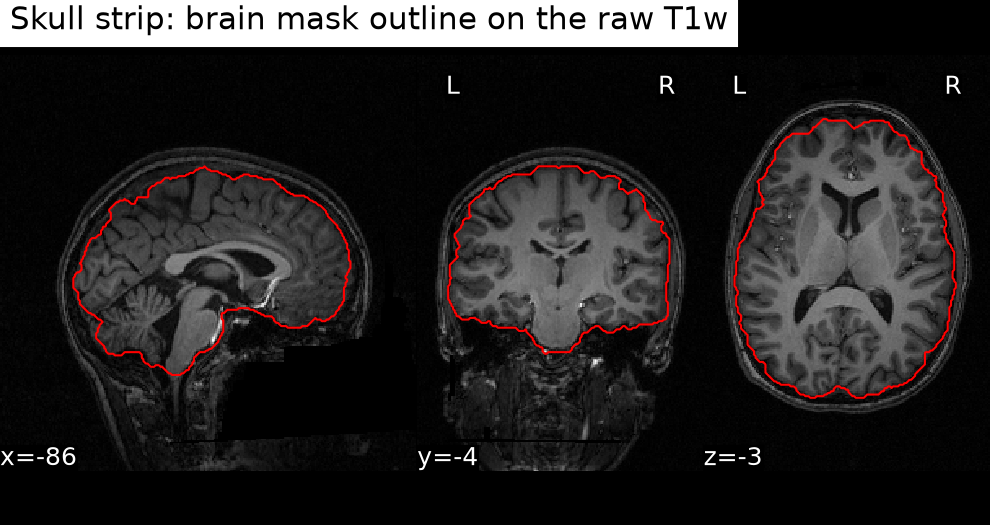
Three views of the raw scan with the brain mask outlined in red
02 · skull stripThe original scan in three views, with the outline of BET's brain mask in red.
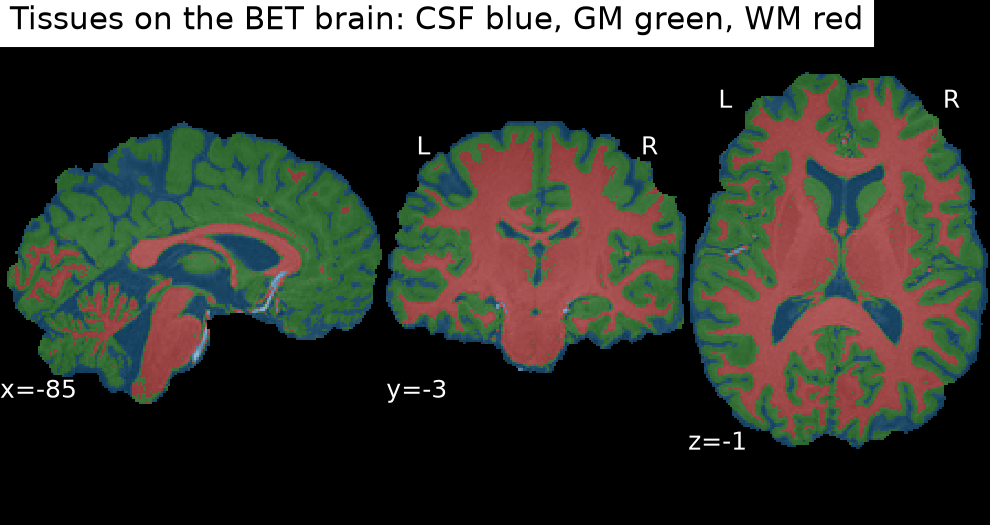
Three views of the brain coloured by tissue: cerebrospinal fluid blue, grey matter green, white matter red
03 · tissuesFAST's labels on the skull-stripped brain: CSF blue, grey matter green, white matter red.
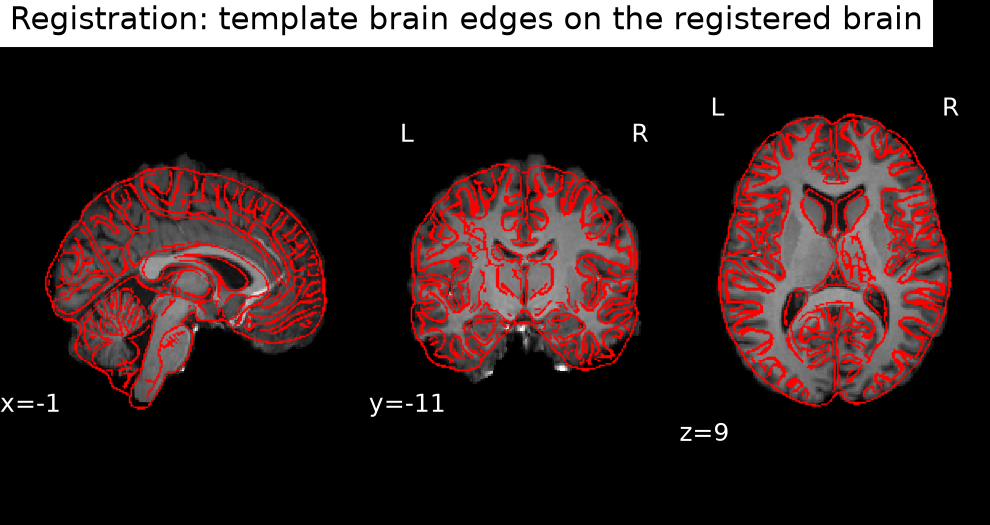
Three views of the registered brain with the template's edges in red
04 · registrationThe brain after FLIRT, with the edges of the MNI template drawn over it in red.

Every run also writes one QC page with all ten subjects' figures and step timings.

04 / Run it yourself

Ten subjects in about half an hour

Everything is public: the code, the data and the Docker image. You don't need an AWS account. Commands are for macOS or Linux.

DockerRuns FSL. Give it about 8 GB of memory. On Apple Silicon, turn on Rosetta for x86 images.
uvBuilds the exact Python environment from the lock file, Python 3.12 included.
AWS CLIDownloads the public data. No AWS account or credentials needed.
Disk spaceRoom for a multi-gigabyte Docker image. The cloud run used a 30 GB disk.
  1. 01
    Get the code
    git clone https://github.com/raihanvaheed/openneuro-t1-pipeline.git && cd openneuro-t1-pipeline
  2. 02
    Build the exact environment
    uv sync --locked
    Stops with an error if anything would differ from the lock file.
  3. 03
    See the plan
    uv run snakemake -n
    Lists every job without running anything.
  4. 04
    Run ten subjects
    uv run snakemake
    Four jobs at a time. The first run also downloads the FSL image. Run it again and it does nothing, because everything is up to date.
  5. 05
    Look at the results
    open results/qc/index.html
    On Linux, use xdg-open instead of open.
  6. 06
    Check your run against mineOptional. Compute a fingerprint of each output and compare it with the published list in docs/fingerprints.txt. The commands are in docs/ec2.md.
Prefer the cloud?The same run on an AWS EC2 machine took 26 minutes, at about $0.10 an hour. No AWS credentials go on the machine.
Read the EC2 guide
05 / Measurement log

Two machines, the same files

The same ten subjects, run with the same code, lock file and Docker image, on my laptop and on an AWS server. Times are per subject unless marked.

LAPTOPAWS EC2
MachineApple Silicon Mac, Docker with 10 CPUs and 8 GBm7i-flex.large: 2 vCPU, 8 GiB, x86
FSLemulated (x86 on ARM)native
Jobs at a time42
Ten subjects, wall time30 min 56 s26 min 6 s
BET4.7 – 8.3 s2.9 – 3.2 s
FAST304 – 447 s220 – 232 s
FLIRT80 – 100 s53 – 67 s
Rerun with nothing changednothing to donothing to do
Fingerprints compared91 of 91 identical
  • On the laptop up to three FAST jobs ran side by side. Alone, FAST took 314 s there.
  • A fingerprint here is the SHA-256 of a file's uncompressed content. The 91 files are the ten raw scans, the template brain and eighty outputs.
  • The Docker image had the same digest on both machines but a different image ID, because the two Docker setups report IDs differently. The pipeline records digests.
  • The result holds for these two machines, this image, this lock file and these ten subjects.
06 / Why this exists

A result is only as good as your ability to produce it again

Change the software version, the machine or the order of steps and a brain-imaging output can change. A step that crashed halfway can leave a file that looks finished.

I wanted a small pipeline where every output can be traced to exactly what made it, checked by eye before it's trusted, and reproduced on a different machine. Then I wanted to prove that last part.

07 / How it's built

Six decisions that keep it honest

01One function names every fileSnakemake decides what to rerun by matching file names, so one hand-typed name that drifted would quietly break resuming. Every path comes from one path builder, and a test ties the published fingerprints to it.
02Files are written whole or not at allEach output is written under a temporary name and renamed only when complete, so a crash never leaves a half-written file that looks finished.
03Each step is one commandSnakemake runs every step as its own openneuro-t1 --step process, the same command you can run by hand. No processing logic lives in the workflow file.
04Shared files are made onceThe template brain and the dataset's own files are built by one job each, so jobs running in parallel never write the same file.
05A record behind every stepEach step writes what produced it: package versions, the Docker image's digest and its timings. The records merge into one file per subject.
06One container, pinned by digestAll FSL steps run in one Docker image, identified by its digest rather than its name. Tests and lint run on every push; the imaging itself is checked by the published fingerprints.
08 / What I learned

Four things I'd tell the next person

Workflows think backwardsSnakemake starts from the final files and works back. If a final file exists, a missing intermediate doesn't trigger a rerun, so my first ten-subject run had to force one subject to be redone.
Trust the installed code over the docsNiWrap 1.1.0 behaved differently from its documentation in about half a dozen places, such as an output parameter that is really a filename prefix. I recorded each one to report upstream.
Compare images by digestThe same Docker image had different IDs on my laptop and on AWS. Its digest matched, which is why the pipeline records digests and not IDs.
Emulation cost time, not correctnessOn Apple Silicon, FSL runs under emulation, and each step was slower than on the cloud machine. All 91 checked files still came out identical.
09 / For healthcare software

Why this matters beyond brain scans

Medical software is judged on traceability: which version produced this result, from which input, and did a person check it before it was used.

This project practises those habits on a small scale: pinned versions, a record behind every output, a person's review before outputs are trusted, and checks that fail loudly instead of quietly. It makes no clinical or regulatory claim.

10 / Limits and next steps

What it doesn't do yet

  • Registration is affine only: moving, rotating, scaling and shearing, with no finer warping.
  • Skull stripping uses default settings. In the QC figures the masks differ most at the base of the skull between subjects.
  • In the QC figures, the labels of deep grey structures vary between subjects.
  • The FSL image is x86-only, so it runs under emulation on Apple Silicon.
  • Tested on ten subjects of one dataset.
  • Automated checks cover the code, not the imaging steps.
Possible next steps
  • Report the NiWrap documentation gaps upstream.
  • Tune skull stripping at the base of the skull.
  • Add nonlinear registration.
  • Run more subjects.